Natural Language to SQL Across Google Cloud: BigQuery, AlloyDB, Spanner, and Cloud Storage (2026)
Google Cloud doesn’t have one database — it has at least four that show up in the same organization’s stack: BigQuery for the warehouse, AlloyDB or Cloud SQL for transactional Postgres, Spanner for globally distributed OLTP, and Cloud Storage for the Parquet/CSV files nobody got around to loading anywhere.
Each is optimized for a different job, which is exactly why organizations pick them. The problem isn’t the architecture. The problem is that a business user asking “who were our highest-value customers last quarter?” now has to know which of the four holds the answer, and which dialect it speaks.
Your users shouldn’t need to know where the answer lives. This guide covers what’s actually different about each Google data store from a natural-language-querying standpoint, how to decide which one a given question should hit, and how Savvina connects to all four without any of your data or schema leaving your infrastructure.
The four Google data stores, at a glance
| Store | What it’s for |
|---|---|
| BigQuery | Analytical warehouse, serverless, billed per query |
| AlloyDB | Transactional Postgres-compatible, high-throughput OLTP/HTAP |
| Cloud Spanner | Globally distributed, strongly consistent OLTP |
| Cloud Storage | Raw files — Parquet, CSV, JSON — no database at all |
None of these are interchangeable, and a system that treats them as “just SQL” gets subtle things wrong: BigQuery billing semantics, AlloyDB’s private-networking default, Spanner’s dialect lock-in, and the fact that Cloud Storage isn’t a database until something puts a schema on top of it.
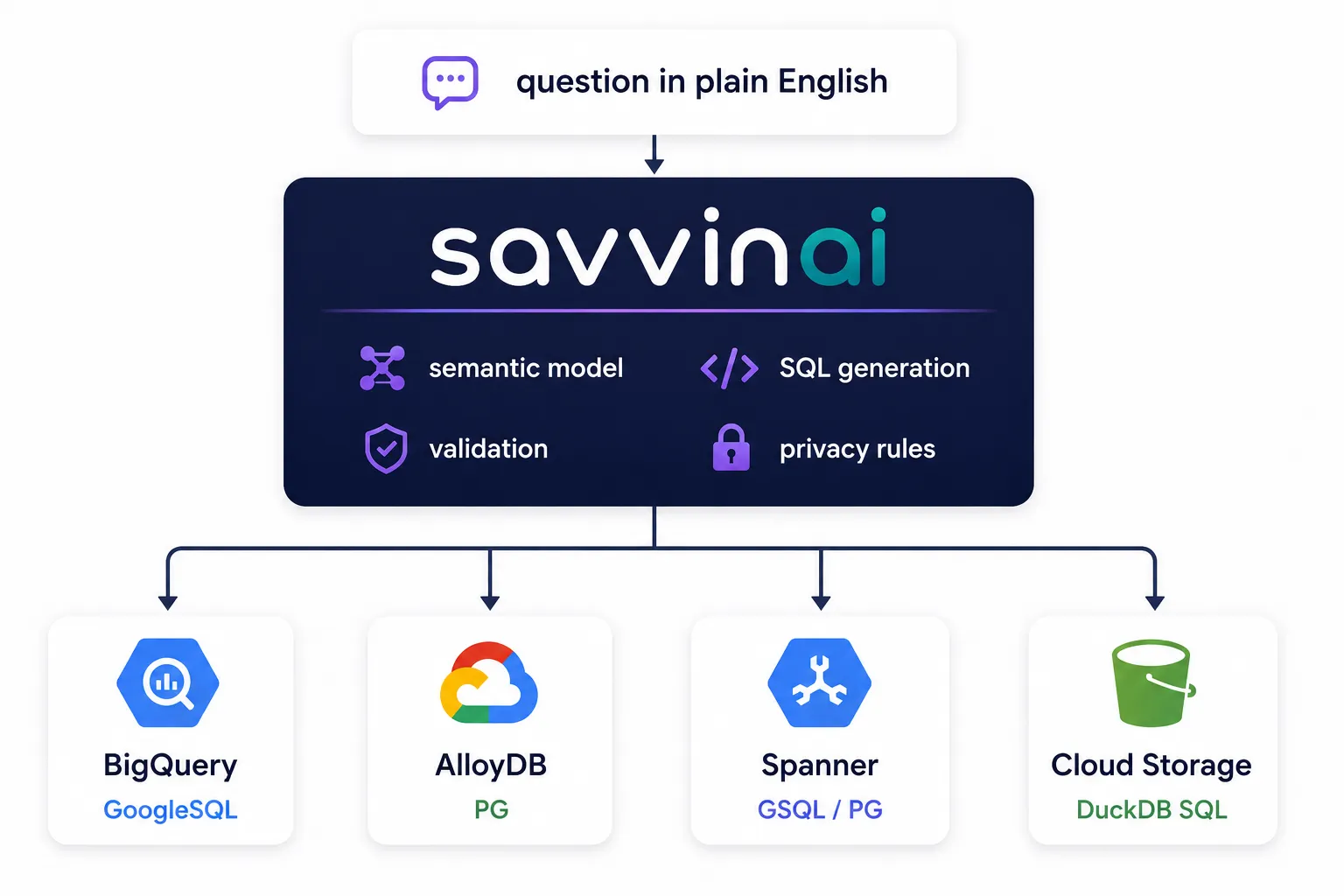
Savvina sits above them rather than replacing any of them — one natural-language surface, four adapters underneath, each speaking its own dialect:
BigQuery: the warehouse, and the one where introspection is free
BigQuery is usually where “ask a question about the business” queries land — it’s the aggregation layer, not the system of record. Three things make it different from every other adapter:
Introspection costs nothing. Savvina never runs SELECT DISTINCT or COUNT(*) against BigQuery to learn its shape — it uses the google-cloud-bigquery client’s metadata calls (list_datasets, list_tables, get_table), which read catalog information without starting a query job and without scanning a byte of table data. Even row counts come from the metadata BigQuery already maintains (table.num_rows) rather than a COUNT(*). On a database you’re billed for by bytes scanned, that distinction matters.
Billing project and data project can differ. A common setup queries bigquery-public-data or a shared analytics project while billing jobs to your own project. Savvina’s connection form has a separate optional Data Project ID for exactly this — leave it blank and introspection targets the billing project; set it to point at a dataset you don’t own but can read. There’s also an optional Dataset ID, which scopes introspection to a single dataset instead of every dataset the service account can see. On a project with hundreds of datasets, that’s the difference between a semantic model that fits in an LLM’s context and one that doesn’t.
Partitioning is carried into the schema. During introspection Savvina reads each table’s time or range partitioning and marks the partition column, so the generated SQL knows which predicate actually prunes bytes scanned rather than guessing.
Connecting needs a service account with two roles:
BigQuery Data Viewer— read datasets and tablesBigQuery Job User— permission to actually run query jobs
Paste the full service-account JSON key into the connection form; it’s stored per-user as a Fernet-encrypted credential, never in the shared connection record. If the account has table-level access but not project-level bigquery.datasets.list, the connection still saves and queries still run — dataset listing is treated as best-effort rather than a hard gate.
Where BigQuery’s dialect trips up generic models:
-- "Show monthly active users for the last 6 months"
SELECT
  DATE_TRUNC(e.activity_date, MONTH) AS month,
  COUNT(DISTINCT e.user_id) AS mau
FROM `my-project`.`analytics`.`user_events` AS e
WHERE e.activity_date >= DATE_SUB(CURRENT_DATE(), INTERVAL 6 MONTH)
GROUP BY month
ORDER BY month;
DATE_TRUNC(date, MONTH) — not DATE_TRUNC('month', date) — and DATE_SUB(CURRENT_DATE(), INTERVAL 6 MONTH) rather than Postgres’s NOW() - INTERVAL '6 months'. Backtick-quoted, fully qualified `project`.`dataset`.`table` identifiers instead of double quotes, and a short alias on every table so BigQuery can’t confuse a column name with the table name when they’re identical. A model that generates Postgres-flavored SQL against BigQuery fails immediately, and one that generates MySQL-flavored SQL fails just as fast in the other direction.
BigQuery also nests data in ways other SQL warehouses don’t: ARRAY<STRUCT<...>> columns can go several levels deep, and the right access pattern is CROSS JOIN UNNEST(array_col) AS alias followed by alias.field_name. Fully expanding every nested field in the schema sent to the LLM burns through the token budget fast — Savvina caps DDL payloads at 20,000 characters and collapses sub-structs beyond one level of nesting to STRUCT<N fields>, because a model that runs out of context mid-schema silently stops annotating columns rather than failing loudly.
AlloyDB: Postgres-compatible, and reachable two different ways
AlloyDB speaks the PostgreSQL wire protocol and exposes the same catalogs, so once connected, everything about introspection, query generation, and validation is identical to a plain Postgres connection — see our PostgreSQL guide for the full dialect breakdown (window functions, JSONB, DISTINCT ON, GENERATE_SERIES, and the rest all apply unchanged).
What’s different is getting to it in the first place. AlloyDB instances default to a private IP — there’s no public endpoint to point a connection string at — so the connection form offers two authentication modes, and they reach the instance differently:
Password mode is ordinary PostgreSQL. You give it a host, port, database, username and password, and point it either at the AlloyDB Auth Proxy running on localhost alongside your backend, or at an instance IP reachable from a VPC-peered network. The default ssl_mode is require, not prefer — AlloyDB expects an encrypted connection by default.
IAM mode needs no proxy sidecar at all. Instead of a host and port you give it the instance URI — projects/P/locations/L/clusters/C/instances/I — and an IAM principal as the username. Savvina connects through the AlloyDB Python connector, which resolves the instance, establishes mTLS, and mints a short-lived OAuth token per connection, so there’s no stored database password anywhere. You also choose the IP type the connector should dial: private (the default), public, or psc for Private Service Connect. The calling identity needs roles/alloydb.client; if it doesn’t have it, the connection times out rather than failing fast, and Savvina says so explicitly in the error.
Either way, there’s no separate dialect to learn. A team already running Postgres text-to-SQL and migrating to AlloyDB changes nothing about how it asks questions — only how the connection reaches the database.
Cloud Spanner: two dialects that never convert
Spanner is the one place where “just SQL” genuinely breaks down. A Spanner database picks its SQL dialect — GoogleSQL or PostgreSQL — at creation time, and that choice is permanent. The two dialects aren’t two modes of the same engine you can toggle; from the customer’s side they’re effectively different products, which is why Savvina ships them as two separate source types, spanner and spanner_pg, rather than a mode toggle you could set wrong.
-- GoogleSQL dialect (spanner)
SELECT customer_id, SUM(amount) AS total
FROM Orders
WHERE order_date >= DATE_SUB(CURRENT_DATE(), INTERVAL 30 DAY)
GROUP BY customer_id
ORDER BY total DESC
LIMIT 20;
-- PostgreSQL dialect (spanner_pg)
SELECT customer_id, SUM(amount) AS total
FROM orders
WHERE order_date >= CURRENT_DATE - INTERVAL '30 days'
GROUP BY customer_id
ORDER BY total DESC
LIMIT 20;The business question is identical. The SQL isn’t.
Both connect through the same synchronous google-cloud-spanner client (wrapped so it never blocks the event loop), using project_id, instance_id, database_id, and a service-account JSON key. The PostgreSQL-dialect variant subclasses the GoogleSQL adapter rather than the Postgres one, because the transport is what they share: one Spanner client, executing SQL in whichever dialect the database was created with. Reaching a PG-dialect Spanner database with a real Postgres driver would need PGAdapter, a separate Java proxy sidecar, and would still fail introspection outright — Postgres introspection reads pg_stat_user_tables and pg_stats, neither of which Spanner provides. Both Spanner adapters read Spanner’s own information_schema instead; what differs between them is the catalog spelling (PG-dialect databases lowercase everything and put user tables in public) and the dialect the LLM is told to write.
One consequence worth knowing: Spanner publishes no row-count statistic in either dialect, so approximate row counts stay empty in the semantic model where BigQuery and Postgres would fill them in.
The practical takeaway: if you’re not sure which dialect your Spanner database uses, check before connecting — the wrong source type produces syntactically valid SQL for the wrong database, which fails loudly, not silently.
Cloud Storage: querying files that were never a database
This is the odd one out. Cloud Storage isn’t a database — there’s no catalog, no query engine, nothing to introspect until you tell Savvina where the files are and what to call them. Savvina uses a DuckDB-backed adapter that talks to GCS through its S3-compatible endpoint (storage.googleapis.com, via DuckDB’s httpfs extension) to scan Parquet, CSV, or JSON files directly out of a bucket, without ever loading the data into BigQuery or Postgres first.
Setup has two parts:
1. HMAC credentials — not a service account JSON, which is what makes this connector different from the other three. Generate them from a service account with roles/storage.objectViewer:
- Cloud Storage → Settings → Interoperability
- Create a key for a service account
- Copy the access key and secret into Savvina’s connection form
2. Table definitions — a JSON array mapping table names to gs:// paths, including glob patterns for partitioned data:
[
  { "name": "daily_events", "path": "gs://my-bucket/events/*.parquet" },
  { "name": "signups_2026", "path": "gs://my-bucket/signups/2026-*.csv" }
]
File format is auto-detected by default; you can pin it to parquet, csv, or json on the connection when a bucket’s extensions lie about its contents. Savvina introspects the files at connection-save time to derive column names and types, exactly as if they were a real table. From there, the LLM generates ordinary SQL against the table names you defined, and DuckDB executes it directly against the files in the bucket.
This is the connector to reach for when data is sitting in a data lake bucket that hasn’t (and maybe never will) get loaded into a warehouse — a nightly export, a partner data drop, or archival Parquet that would be wasteful to duplicate into BigQuery just to ask it a few questions. The same DuckDB-backed adapter pattern also covers S3, Azure Blob/ADLS Gen2, MinIO, Cloudflare R2, public HTTP, and Hugging Face Datasets — so a team with data spread across more than one cloud’s storage isn’t stuck with four different tools.
Which one should a given question hit?
In practice, most organizations run more than one of these, and the right one depends on where the answer actually lives:
- “What’s our revenue trend by region this quarter?” → BigQuery. It’s the aggregation layer; this is what it’s for.
- “Show me this customer’s current order status.” → AlloyDB or Cloud SQL. Live transactional state, low-latency point lookups.
- “How many transactions did this account process in the last hour, globally?” → Spanner. Distributed, strongly consistent, built for exactly this shape of query at scale.
- “What’s in last month’s partner data drop?” → Cloud Storage. Nobody loaded it anywhere yet, and maybe nobody should.
A team doesn’t have to pick one connector and force every question through it — register all four as separate connections and route each question to whichever one holds the answer.
The semantic model is per-connection, deliberately
Connecting a database to an LLM isn’t enough. A column called cust_id isn’t self-explanatory, and a table called orders might mean transactions in one system and subscriptions in another.
That’s what the semantic model is for, and it’s scoped to a single connection rather than shared across your estate. Each connection gets its own column descriptions, business definitions, privacy rules, and example question/query pairs — so a column marked sensitive in AlloyDB has no bearing on what’s visible in BigQuery, and “active customer” can mean one thing in the warehouse and another in the operational database without the two definitions fighting.
Because the model is generated from introspected schema, regenerating it is how you pick up new tables and columns. Savvina hashes the structural elements of the schema and tells you when the hash has drifted since the model was last generated.
What you don’t have to change
Adopting natural-language querying over Google Cloud doesn’t mean rebuilding the data architecture. You don’t have to:
- Consolidate into BigQuery. Four connections, four dialects, one interface.
- Replace AlloyDB or restructure Spanner. Both are read as they are.
- Load every Cloud Storage file into a warehouse to ask it a question.
- Expose a database publicly. AlloyDB’s private IP is the expected case, not a workaround.
- Send your schema to a third-party API. Savvina is self-hosted; nothing about your data or schema metadata leaves your infrastructure to reach an LLM unless you point it at a hosted provider yourself.
Common Questions
Can Savvina join data across BigQuery and AlloyDB in one query? No — each connection is queried independently through its own adapter and dialect. Cross-source joins would need the data to land in one engine first (for example, via a BigQuery external table or a federated query set up outside Savvina).
Do I need a different service account for each Google connector? You can use one, scoped with the union of required roles, or separate service accounts per connector for tighter least-privilege boundaries. Savvina stores each connection’s credentials independently either way.
Do I need the AlloyDB Auth Proxy?
Only in password mode. IAM authentication connects through the AlloyDB Python connector, which resolves the instance, establishes mTLS and mints a short-lived token per connection — no proxy sidecar. The calling identity needs roles/alloydb.client.
What happens if I connect the wrong Spanner dialect by mistake? The connection will fail at introspection or produce SQL that Spanner rejects outright — GoogleSQL and PostgreSQL-dialect Spanner reject each other’s syntax immediately rather than silently returning wrong results.
Does the Cloud Storage connector support partitioned/date-sharded files?
Yes — the table definition’s path accepts glob patterns (gs://bucket/events/year=*/month=*/*.parquet), and DuckDB resolves them at query time.
Is BigQuery query cost a concern with an LLM in the loop?
Introspection is free — it reads table metadata through the BigQuery client API and never starts a query job. Generated queries do run as normal billed BigQuery jobs, so the same cost controls that apply to any BigQuery workload — partition filters, LIMIT, byte-scan quotas — apply here too.
Are the Google connectors in the free Community Edition? No. Community Edition ships PostgreSQL and MySQL only. BigQuery, AlloyDB, Spanner and Cloud Storage are on the paid plans — Starter lets you pick 3 data source types, Team and Business include all 22.
Where to Go Next
- Text-to-SQL for PostgreSQL — the full dialect and architecture breakdown that AlloyDB inherits
- Introducing Savvina — semantic caching and privacy architecture in detail
- The Rise of Self-Hosted AI Analytics — why teams are moving this workload off third-party cloud APIs
- Pricing — which plans include which data source types
- GitHub Community — ask questions about connecting your specific Google Cloud setup
The community edition is free, self-hosted, and BSL 1.1 licensed, converting to Apache 2.0 in 2030.