
Frequently asked questions
Everything you need to know about Savvina AI — from first connection to production accuracy. Can't find your answer? Email [email protected].
General
What is Savvina AI?
Savvina AI is a self-hosted, natural language analytics tool. You connect it to your database, ask questions in plain English, and it generates and runs the SQL — then returns clean results and charts. No SQL knowledge required.
Who is it for?
Anyone who needs answers from a database but doesn't write SQL — executives, finance teams, product managers, sales, HR, and ops. It's also useful for data teams who want to offload routine lookups.
Is there a cloud version?
Not yet. A cloud-hosted edition is planned for a later date. Today, Savvina runs entirely on your own infrastructure — on-prem, in your VPC, or on AWS / Azure / GCP.
Data Sources & LLMs
Which databases does Savvina support?
The Community Edition supports PostgreSQL and MySQL/MariaDB. The commercial edition adds MongoDB, Snowflake, BigQuery, Redshift, Databricks, ClickHouse, SQL Server, Athena, Trino, and object storage sources (S3, GCS, MinIO, R2, Azure Blob).
Which LLM providers are supported?
Claude (Anthropic), OpenAI, Groq, Google Gemini, Cerebras, Mistral, Ollama, and any OpenAI-compatible endpoint — including HuggingFace, Together.ai, OpenRouter, vLLM, and LM Studio. You can switch providers per session.
Can I run it completely offline?
Yes. Using Ollama with a locally pulled model (e.g. llama3 or qwen2.5-coder), Savvina runs with zero internet egress. No data ever leaves your machine.
Do I need to pay for an LLM API?
Not necessarily. Groq and Google Gemini both offer a free API tier with no card required — Groq's general-purpose models commonly allow around 1,000 requests a day, and Gemini's Flash models somewhere between roughly 20 and 250+ depending on the model. Either is enough to evaluate Savvina at no cost. Limits change without much notice, so check the provider's current rate-limit page.
Privacy & Security
Does my data get sent to the LLM?
Never. Only your schema description and your natural language question are sent to the LLM. Query results stay entirely within your infrastructure.
Can I control what the LLM sees?
Yes, with column-level precision. You can exclude specific schemas, tables, or columns entirely. Sensitive patterns like email, ssn, and password are auto-flagged. You can also toggle whether sample values, column comments, or row counts are included in the prompt.
Is it safe to run against a production database?
Savvina only ever issues SELECT statements. Every generated query is validated before execution — writes are not possible by design.
How are credentials stored?
Database credentials and LLM API keys are encrypted at rest using Fernet (AES-128) before being stored. They never appear in logs or backups.
What does the audit log record?
The audit log captures who ran a query, when, and which model was used — but never the actual data values returned.
Setup & Deployment
How long does it take to get running?
About 5 minutes, most of it waiting for the image pull. Clone the repo, copy .env.example to .env, set one password (APP_DB_PASSWORD), run docker compose pull and docker compose up -d --no-build, and open http://localhost:3000. Encryption and JWT keys are generated on first boot, and your LLM API key goes in through the UI — nothing else to set. On a server reachable from the internet, follow the deployment guide instead — lock the ports down before the first start, since the first visitor creates the admin account.
What are the minimum requirements?
Docker Engine 24+ with the Compose plugin v2.24.4 or newer (or Docker Desktop on a laptop), at least 4 GB RAM (8 GB+ recommended under concurrent load, or if running Ollama locally), and at least 30 GB disk — the backend image itself is about 1 GB, the rest is headroom for the app database, Docker build cache and the OS.
Can I try it without a real database?
Yes. Set COMPOSE_PROFILES=local-db,test-dbs in .env before starting and the stack also brings up pre-seeded PostgreSQL (port 5435) and MySQL (port 3307) demo databases. Add them from Connections with user savvina and the default password savvina_demo. Those two ports are published on every interface like the rest, so on an internet-facing server include them in the deployment guide's port lockdown.
Execution Modes & Accuracy
Does Savvina execute queries automatically?
It depends on your configuration. There are three execution modes: Auto-execute (runs immediately), Review-first (shows the SQL for approval before running), and Generate-only (returns the SQL only, for a DBA to run manually). You set the mode per connection.
How does accuracy improve over time?
Every thumbs-up on a result is added to a few-shot example library. The next time a similar question is asked, that example is included in the prompt — so accuracy compounds with use, without any manual tuning.
Does Savvina cache queries?
Yes. A two-level cache combines exact-match and semantic-similarity matching. In production, this typically reduces LLM calls by 40–60%, cutting both latency and inference cost.
Pricing & Licensing
Is Savvina free?
The Community Edition is free for development, testing, and non-commercial use under the Business Source License 1.1. Production or commercial use requires a commercial license. On June 1, 2030, the project converts to Apache 2.0.
When will the production edition be available?
It's available now. See our pricing page at savvina.ai/pricing for plans, or contact [email protected] for more information.
Is there per-query pricing?
No. Savvina has no query metering. You bring your own LLM key and pay only for whatever that provider charges — or nothing at all if you use a free tier or Ollama.
How many deployments can I run on one license key?
One. The first deployment to check in claims the key, and another deployment presenting the same key is refused. Email [email protected] to find out which deployment holds it and when it last checked in. Need staging alongside production? Contact [email protected].
How do I move my deployment to a new server?
Stop the old deployment, then email [email protected] to have its claim released — usually the same day. Set the same license key on the new server and start it; it registers itself on the first check-in. There's nothing to copy across beyond the key itself.
What does my deployment send to Savvina?
Once a day it validates the license key against license.savvina.ai, sending the key, an installation identifier your own deployment generates, the software version, and the active-user count — plus a timestamp and a one-time nonce. No query content, schema, credentials, or business data ever leaves your infrastructure. We also store an irreversible hash of the request's network address to detect a key being shared across unrelated deployments; see the Privacy Policy for the details.
The Semantic Model
The Semantic Model and the Example Library are the two features that most directly determine how accurate and consistent Savvina's answers are.
What is the Semantic Model?
The Semantic Model is a business-context layer that sits between your raw database schema and the LLM. Without it, the LLM sees column names like cx_tp_cd or ord_sts and has to guess what they mean. With it, the LLM knows exactly that ord_sts = 'C' means Confirmed, that total_amount should always be summed and formatted as currency, that one row in orders represents one order, and that cancelled orders should be excluded from revenue by default. It's the difference between a model that produces plausible-looking SQL and one that produces correct SQL for your specific data.
How is the Semantic Model generated?
After connecting a database and refreshing the schema, you trigger generation from the Semantic Model tab. Savvina runs a three-phase pipeline: it introspects your schema, sends batches of up to 4 tables at a time to the LLM for annotation, then makes a final call to generate cross-table business metrics, derived columns, join patterns, and named segments. The whole process takes 10–60 seconds depending on schema size.
What exactly does it contain?
The model is rich. For each table it stores a human-readable display name, a plain-English description, a grain statement (what one row represents), default SQL filters that are always applied, the primary timestamp and date columns, partition and cluster hints, and hierarchies for drill-down. For each column it adds a display name, a semantic type (monetary, identifier, status flag, etc.), cardinality, value mappings for coded fields, sensitive flags, and the correct aggregation function. At the cross-table level it defines named Business Metrics, Derived Columns with exact SQL expressions, Segments, Relationships, and Time Expressions.
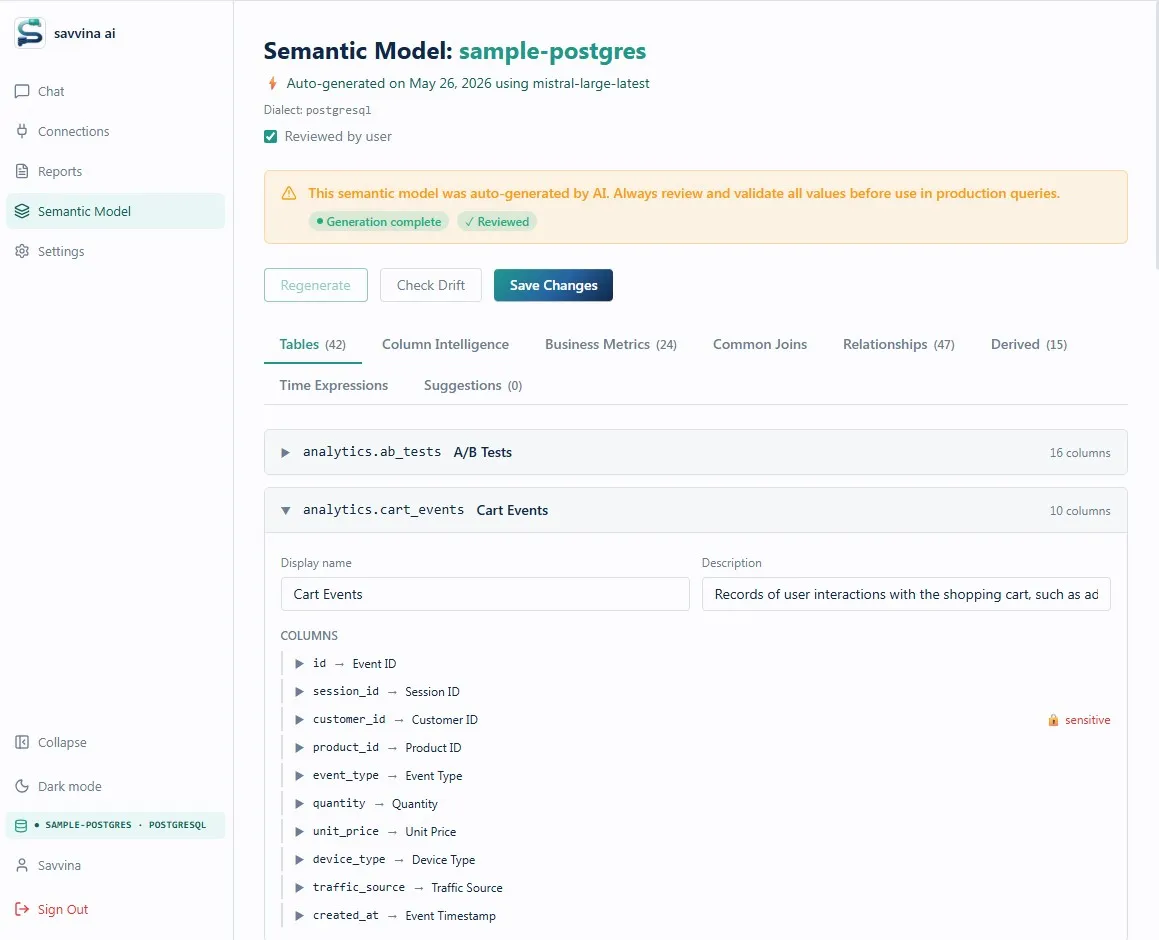
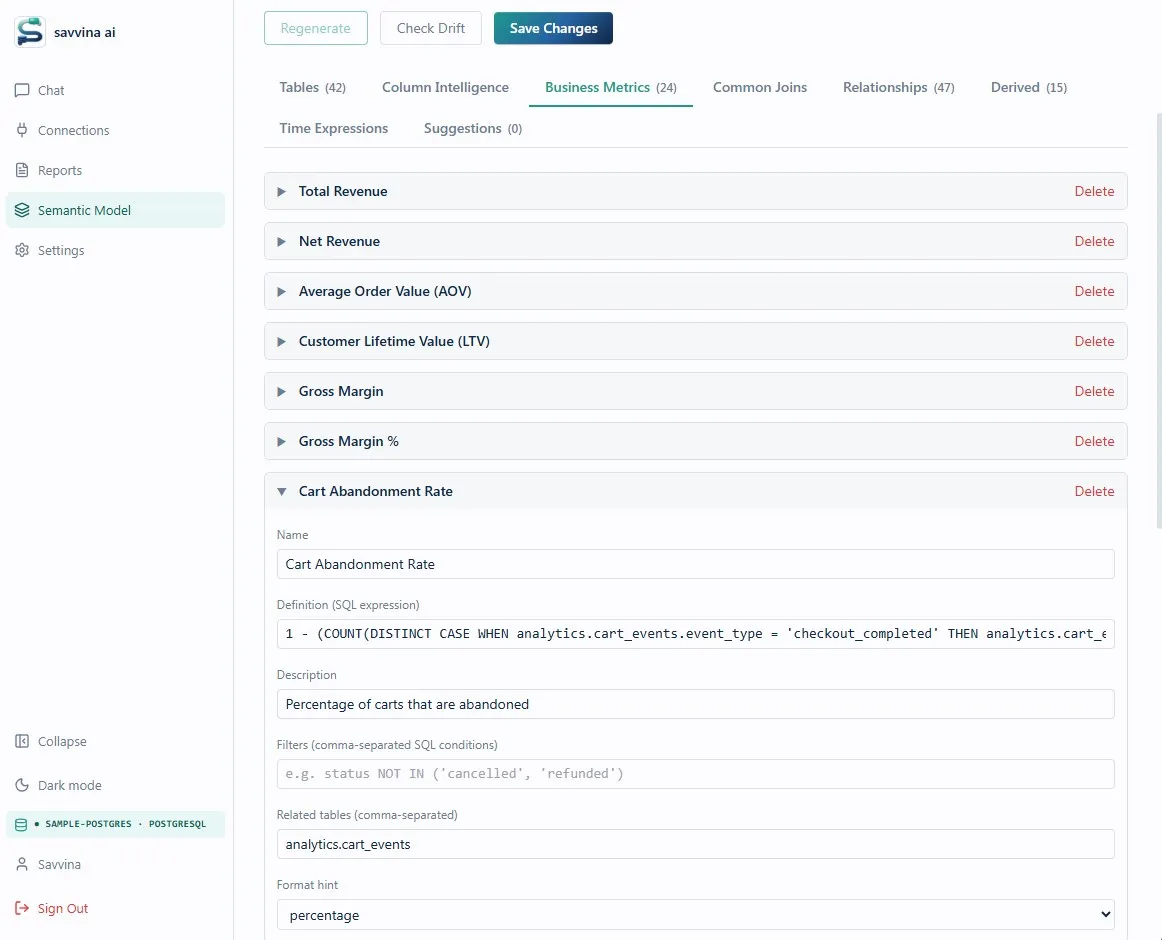
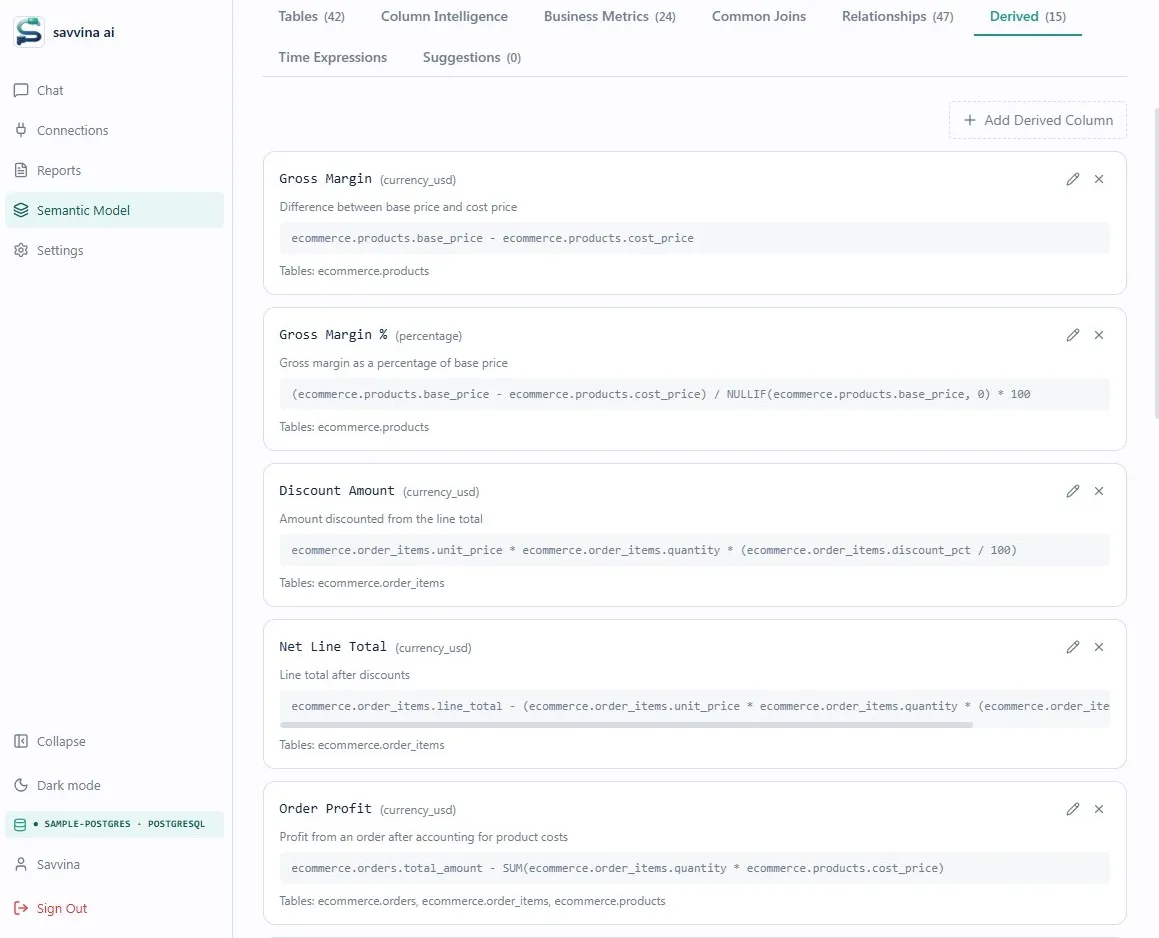
⚠ Always review the auto-generated model
The auto-generated Semantic Model is a strong starting point, but it is produced by an LLM that has never seen your actual data. It guesses status values from training data, infers column meanings from names, and may define business metrics with filters that don't match your real values. The Semantic Model should always be reviewed by someone who knows SQL and understands your data model — ideally a data engineer or analyst. The most critical things to verify are Business Metric filters (check actual distinct values with SELECT DISTINCT status FROM table), value mappings on status and type columns, default filters on high-stakes tables, and grain statements on fact tables.
What is "Check Drift" and when should I use it?
Drift detection compares your saved Semantic Model against the live schema — no LLM call, no database query, just a structural comparison. It will warn you about tables or columns that have been removed since generation, and flag any Business Metrics that reference tables which no longer exist. Run it after any schema migration or significant schema change. It does not auto-fix the model; it only tells you what's out of sync so you can decide whether to regenerate or patch manually.
If I regenerate, do I lose my edits?
Yes. Regeneration replaces the entire model. If you've spent time refining metric definitions and value mappings, export or note them before regenerating. After a minor schema change (adding a new table or a few columns), it's usually better to add or edit only the affected parts manually and run Check Drift, rather than regenerating the whole model.
What parts of the model matter most for query accuracy?
In order of impact: default filters on tables (these enforce domain constraints on every query), Business Metric filters (make sure status values match your actual data), value mappings on status and type columns (prevent the LLM from hallucinating values that don't exist), and grain statements (prevent incorrect fan-out joins). Descriptions and display names help with question understanding but have less impact on correctness.
What happens if my schema is very large and the model doesn't fit in the LLM's context window?
Savvina compresses the prompt progressively before dropping content. First, few-shot examples are removed. Then the schema is compacted (per-table DDL and relationships are stripped, but Business Metrics, Segments, and Time Expressions are preserved). If it's still too large, the full semantic model is dropped. To mitigate this: use a provider with a larger context window (Claude or GPT-4o), exclude unused schemas and tables via connection privacy settings, and keep descriptions concise. Business Metrics and Segments survive compression the longest — prioritise filling those in if you can only do part of the model.
The Example Library
What is the Example Library?
The Example Library is a few-shot learning system that accumulates question–SQL pairs over time. Every time a user gives a thumbs-up to a result, that question and the SQL Savvina generated for it are stored and embedded. On future queries, semantically similar past examples are retrieved and included in the LLM prompt as demonstrations — showing the model exactly how your questions map to correct SQL for your specific schema.
How does it improve accuracy over time?
Out of the box, Savvina generates SQL from the schema and Semantic Model alone. After a few weeks of use and positive feedback, the prompt also contains 3–5 worked examples of questions your team has actually asked, with the SQL that produced the right answers. This compounds: the more questions get a thumbs-up, the more precisely the LLM can handle edge cases, ambiguous phrasing, and your organisation's particular terminology.
What triggers an example being added?
Only explicit thumbs-up feedback from a user. Neutral sessions and thumbs-down do not add to the library. This means the library only learns from verified-correct answers — low-quality feedback doesn't pollute it.
What happens with a thumbs-down?
Thumbs-down does not remove an existing example from the library. It is primarily a signal for you to investigate and, if needed, correct the Semantic Model that led to the wrong result.
Can I add examples manually?
Yes — through both the UI and the API. Under Settings → Examples Library, there's a "Verified Examples Library" form where you can type a natural language question and its corresponding SQL query, then click Add Example. This is especially useful for pre-seeding the library with your most common or business-critical questions before users start generating organic feedback. You can also use the API for bulk seeding.
Is the Example Library shared across users on the same connection?
Yes. Examples are stored per-connection, so positive feedback from any user on a shared connection benefits everyone querying that database.
Do examples replace the Semantic Model?
No — they complement it. The Semantic Model defines the rules; the Example Library demonstrates how those rules play out for real questions. In the event of a very large schema, examples are the first thing dropped from the prompt to make room (the Semantic Model is considered higher priority). For best results, invest in the Semantic Model first and let the Example Library grow naturally through use.
Still have questions?
Reach us at [email protected] or join the conversation onGitHub Discussions.